


MelodyCraft - AI Music Maker
4.5999.00 Reviews
App Specs
- Version
- 1.18.0
- Updated On
- License
- Free
- Downloads
- 100,000+
- Developer
- Meta Innovation
- Categories
- Music & Audio
- Platform
- Android
Screenshots
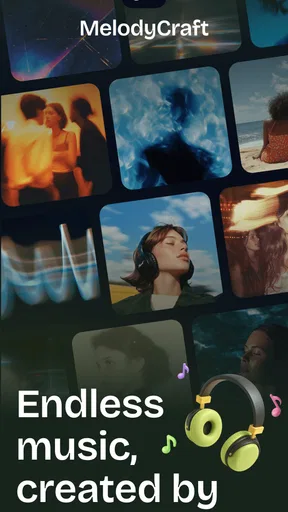
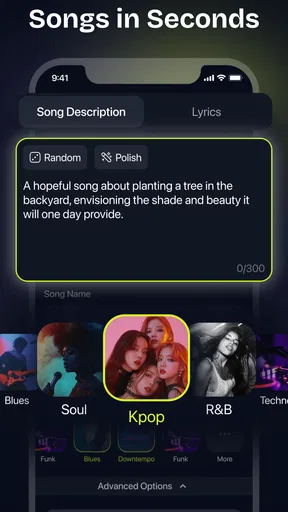
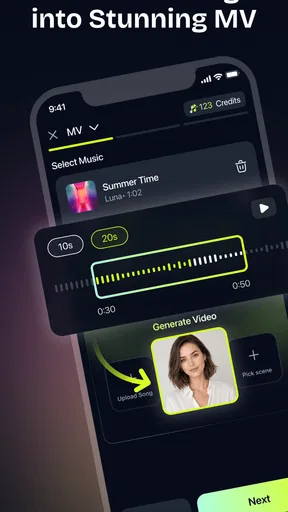

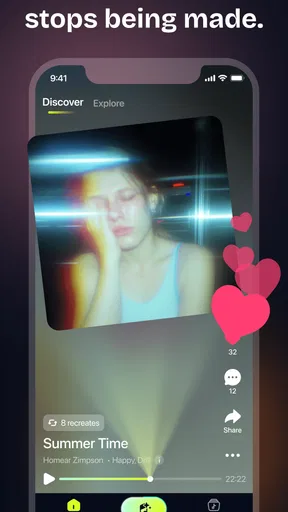
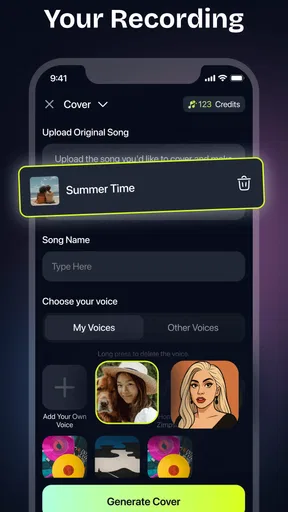
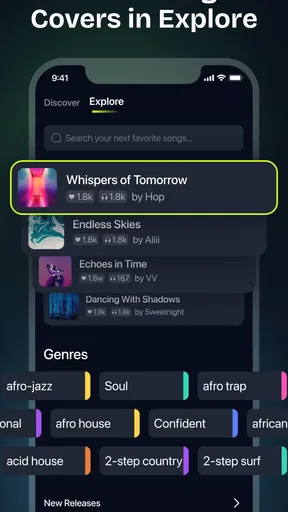
 Analysis by AppCompare
I’d approach MelodyCraft - AI Music Maker as a low-pressure way to try making music, not as a shortcut to mastering a full recording studio. It is a music-making app from Meta Innovation, and its appeal is easy to understand: you can begin with an idea rather than a deep knowledge of chords, arranging, or production. For a first-time user, that can make the gap between “I wonder what this would sound like” and hearing a rough musical result feel much smaller.
What to expect from an AI music maker
The key distinction is that an AI-assisted creator is not quite the same thing as a traditional instrument app or a full digital audio workstation. A piano app gives you an instrument to play; a studio-style app often expects you to build a track piece by piece. MelodyCraft’s central promise is to help shape musical ideas with AI suggestions, so I’d use it as a starting point for experimentation rather than expect every decision to be made for me.
That difference matters when setting expectations. Suggestions can help me get past a blank page, but they are prompts to react to, not proof that a draft is finished. I still need to listen for whether the mood, pacing, and parts fit the idea I had in mind. If I want exact control over every note, a more hands-on composing tool may suit me better; if I mainly want a quick way to explore a tune, this kind of guided approach is more inviting.
The app is free to install and is rated for Everyone. It has a 4.5 average from around 4,600 ratings, with over 50,000 installs. Those figures suggest that people are trying it, but they do not tell me whether its workflow will suit my own habits. I’d treat the first session as a practical test: can I move from an idea to a result I want to keep exploring?
Making the first session less intimidating
Before opening the app, it helps to have a simple goal rather than a grand one. I might aim to sketch a calm background tune, try a lively rhythm, or find a short melodic idea for a personal project. Keeping the goal small makes it easier to judge the suggestions: instead of asking whether the app can create “good music” in general, I can ask whether it helped me get closer to this particular mood.
On first launch, I’d take a moment to look around before committing to a complicated project. The original experience is described as guided, with a dashboard and templates, but a template should be treated as a launchpad, not a locked-in result. If one feels close to the direction I want, I can use it to get moving; if it pulls the piece toward the wrong mood, starting with a different route is likely less frustrating than trying to force a mismatch.
It is also worth separating exploration from finishing. In an early session, I would try a few different prompts or starting points and listen for what changes, rather than polishing the first result immediately. That small comparison can teach me what kinds of input lead toward the sound I want. I would keep any description plain and specific—mood, energy, or intended use—rather than loading it with technical terms I may not understand.
Worth Reading Before You Choose

Switching to Android Auto Means Rethinking Your Driving Routine

Google Calendar Makes a Crowded Week Easier to Manage

Baby Panda World Brings Quick Play to Modern Phones, but Its Game Library Feels Busy

ESPN’s Live Game View Makes Following Close Games Easier

QuizzLand Review: A Good Fit for Short Trivia Breaks, Not Every Player

Basketball Stars: Multiplayer Is Fast, but Can It Recover When Matches Go Wrong?
From a first idea to a useful draft
A realistic first success might be a short piece to play while working, a personal theme for a slideshow, or a melody to share with a musically experienced friend for feedback. I would listen once for the overall feeling, then again for one concrete detail: does the tune feel too busy, does the rhythm support the mood, or does one suggested part stand out? Focusing on one question at a time makes AI feedback easier to use than trying to judge every musical choice at once.
One useful trade-off is to accept a suggestion that is not quite what I expected if it gives me something interesting to build on. AI assistance can be most valuable as a source of alternatives, especially when I’m stuck repeating the same idea. But if a suggestion takes the piece away from the purpose I had in mind, I would not keep it just because it sounds polished. The point is to make a draft that feels like a step toward my goal, not to surrender the goal to the tool.
For a practical everyday scenario, I can picture having ten minutes between tasks and wanting a short, upbeat cue for a private video. I’d pick a fitting starting direction, listen to the first result, and decide whether it needs more energy or a calmer feel before spending time on details. That is a better use of a quick mobile session than trying to produce a finished, release-ready track during a short break. If the idea becomes worth developing, I can return to it with more patience.
Getting Started with MelodyCraft
The first thing you’ll notice when you fire up MelodyCraft - AI Music Maker is its sleek and intuitive interface. Even if you're new to music creation, the app does a stellar job of guiding you through the process. There’s no overwhelming jargon or complex menus to navigate. It’s all about making music accessible and fun!
Once you’ve signed up and logged in, you’re greeted with a clean dashboard that offers a range of templates to get you going. Whether you’re into pop, rock, or electronic, there’s a starting point for everyone. You can also start from scratch if you’re feeling adventurous.
Features that Strike a Chord
Now, let’s dive into what makes this app tick. The AI-driven engine is the heart and soul of MelodyCraft. It analyzes your input and suggests chord progressions, melodies, and even harmonies. It’s like having a seasoned musician by your side, offering guidance and inspiration.
One of my favorite features is the real-time feedback. As you create your melody, the app provides suggestions to enhance your piece. It’s interactive and incredibly engaging. Plus, the built-in instruments sound surprisingly authentic. Whether you’re using a virtual piano, guitar, or drums, the sound quality is top-notch.
Collaborate and Share
Music is often a collaborative effort, and MelodyCraft embraces that. The app allows you to share your projects with friends or collaborators. You can easily export your tracks or invite others to contribute to your piece. It’s a fantastic way to work with others, especially in a remote world.
Imagine sending your melody to a friend who’s a whiz at guitar solos, and they can add their flair directly within the app. It turns music-making into a social experience, breaking down geographical barriers.
Working with suggestions and shared drafts
For a collaboration to be useful, I would send a focused draft rather than asking a friend to fix everything. A short note such as “I’m aiming for a relaxed feel; does the melody fit?” gives the other person something clear to respond to. That makes the app’s sharing option more practical: it can support a specific exchange of ideas instead of becoming a vague request for feedback.
I would also keep an untouched version of a promising idea before experimenting further. This is a simple creative habit, not a special feature claim: preserving a starting point makes it easier to compare a changed arrangement with the original direction. When AI suggestions are involved, that comparison helps me decide whether a new version is genuinely better or merely different.
There is a useful distinction between sharing a draft and handing over a finished production. A collaborator who plays an instrument may be able to suggest a part or contribute an idea, but a generated sketch may still need human editing to meet a specific brief. For a casual project, that can be enough. For a client deliverable, a carefully arranged score, or a track that must meet strict technical requirements, I would plan for a more controlled production workflow.
Where it fits among music apps
Compared with a conventional loop library, MelodyCraft sounds better suited to someone who wants help forming an idea than someone who only wants to drag ready-made sounds onto a timeline. Compared with a full production workstation, its guided approach may be easier to approach but is not automatically a replacement for detailed editing. Those tools solve different problems: one helps me get started, while the other may give me finer control once I know exactly what I want.
It is also different from learning an instrument. If my main goal is to improve at piano or guitar, regular practice with an instrument-focused app or lessons will teach skills that AI-generated suggestions cannot teach on their own. I’d choose MelodyCraft when my immediate goal is to explore composition, test a musical mood, or create a starting draft—not when I want a structured course in musicianship.
That makes the best audience fairly specific. Curious beginners, songwriters who need a spark, and people making informal music for personal projects may find the guided suggestions encouraging. Someone who already has a precise arrangement in mind, needs advanced mixing controls, or wants every musical choice to come from their own hands may be happier with a traditional studio tool. I would not treat either option as universally better; it depends on whether I need inspiration or control.
A Few Notes on Usability
As much as I adore this app, it’s not without its quirks. While the interface is generally user-friendly, there are occasional hiccups when loading larger projects. It’s something to be aware of, especially if you’re working on a complex piece. That said, the developers are actively updating the app, so I’m hopeful these issues will be ironed out soon.
Another point to consider is the subscription model. While the basic version offers plenty of features to get you started, some of the more advanced tools require a premium subscription. It’s worth weighing the cost against how much you plan to use the app.
Understanding the cost before investing time
The app itself is free, while in-app purchases range from $1.99 to $99.99 per item. I would try the basic creative flow before paying for anything: first see whether the suggestions are useful, whether the instruments suit the kind of sketches I make, and whether I come back to finish ideas. A purchase only makes sense if a particular paid option solves a real limitation in my routine, rather than because I assume I need every advanced tool.
Version 1.11.1 is listed for Android 7.0 and later, so I’d check that my device meets the minimum before planning a session around it. That is especially sensible if I intend to work on a larger project, since the reported loading hiccups make it wise to start with a modest draft and see how my own device handles it. I would avoid making my first test a long, complicated composition.
One question a new user may have is whether they need musical training. I don’t think the app’s guided premise requires that as a starting point; the more useful skill is being able to describe what I want to hear and make simple choices after listening. Another natural question is whether an AI-generated first pass will be ready to publish. I would not assume so: a promising draft can still need careful revisions, and any serious release deserves a separate check of its arrangement and production needs.
For sharing, I’d begin with a low-stakes project and make sure the result communicates what I intended before involving someone else. If a friend is contributing, a clear creative direction and a focused question are more helpful than sending a track with no context. And if my goal is simply to listen to finished music rather than make it, a streaming app is the more direct choice; MelodyCraft is for the person who wants to participate in creating a sound.
Final Thoughts
In a nutshell, MelodyCraft - AI Music Maker is a brilliant app for anyone looking to dive into music creation. It breaks down the barriers of entry and makes composing accessible to all, regardless of musical background. The combination of AI-powered suggestions and high-quality instruments provides a comprehensive toolkit for crafting your own tunes.
Whether you’re a budding artist or just looking to have some fun with music, this app offers a dynamic and rewarding experience. So, go ahead, unleash your inner musician, and let MelodyCraft help you create your next hit!
My practical recommendation is to start with one small musical task, test a couple of directions, and keep the first draft that genuinely makes you curious. MelodyCraft is at its best when it gives you momentum and a way to explore; it is less convincing as a promise that a finished song appears without your judgment. If you enjoy shaping ideas and can live with occasional friction on larger projects, it is an approachable place to begin. If you need precise production control from the first note, I’d choose a more traditional composing setup instead.
Pros
- Intuitive interface for easy music creation.
- Wide range of instruments and effects available.
- AI generates unique melodies quickly.
- Supports exporting to multiple audio formats.
- Regular updates with new features.
Cons
- Limited free version features.
- Requires internet for AI functionalities.
- Occasional lag on older devices.
- In-app purchases can be pricey.
- Basic tutorials could be more detailed.
FAQs for MelodyCraft - AI Music Maker
What is MelodyCraft - AI Music Maker?
MelodyCraft - AI Music Maker is an innovative app designed for music enthusiasts and creators. It harnesses the power of artificial intelligence to help users compose and produce music effortlessly. Whether you're a beginner or a seasoned musician, this app provides tools to generate melodies, harmonies, and even full tracks with ease.
Is MelodyCraft suitable for beginners?
Absolutely! MelodyCraft is designed with user-friendliness in mind, making it ideal for beginners. The intuitive interface guides users through music creation, offering tutorials and suggestions. The AI assists by generating music ideas and structures, allowing newcomers to explore their creativity without feeling overwhelmed.
What platforms is MelodyCraft available on?
MelodyCraft is available for both Android and iOS devices. Users can download it from the Google Play Store or the Apple App Store. The app is optimized for smartphones and tablets, ensuring a seamless experience regardless of your preferred device.
Does MelodyCraft require an internet connection?
While some features of MelodyCraft might require an internet connection, such as downloading updates or accessing cloud storage, the core functionalities of music creation can be used offline. This allows users to compose music anywhere, even without internet access.
Are there in-app purchases in MelodyCraft?
Yes, MelodyCraft offers in-app purchases. While the app provides a range of free features, additional tools and advanced functionalities can be unlocked through purchases. These might include premium sound packs, advanced editing tools, and exclusive AI-generated music styles.


